

This module aims to replace the traditional time cards, biometrics and attendance logbooks in recording your employee’s attendance.
To use this module you simply need to do the following:
1.) Update the schedule of all your employees and make sure they are accurate via the Employee Schedule Module. Read more about Setting Up Employee Schedule

2.) After setting up the employee schedule. Create a 5 digit PIN code for each employee.
To do this, from the top menu click EMPLOYEES > MANAGE EMPLOYEES. Then click on the EDIT ICON of the employee that you want to update.
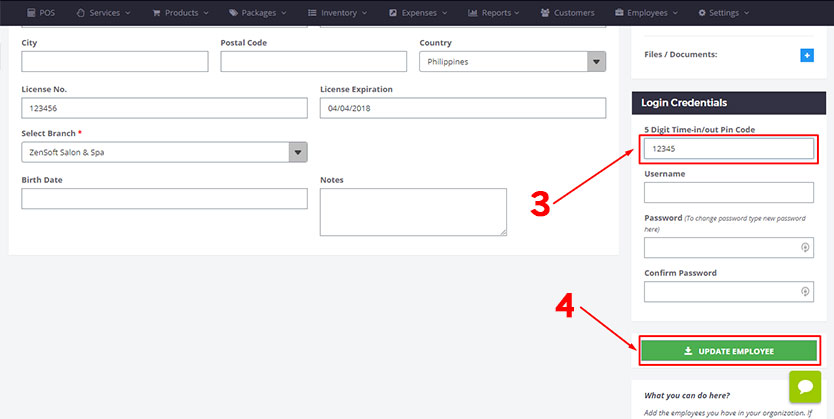
3.) Type a 5 digit pin code (numbers only). Each employee must have a unique PIN code.
4.) Click the UPDATE EMPLOYEE button to save. The 5 digit PIN code will be used by the employee when she uses the TimeClock module.
5A.) Setup ZenSoft’s Timeclock Module in your mobile phone. Read more about Setting Up TimeClock Module in Mobile Phone
5B.) Teach employees how to use TimeClock Module. Read more on How to Log-in/out using TimeClock Module
 6.) Get reports from the admin dashboard for your payroll computation. Click REPORTS > EMPLOYEE > TIME-IN/OUT reports